Dictation that
feels instant.
Hold your hotkey. Speak. Release.
Your text is pasted where your cursor is — in about 300 milliseconds.
Real-time streaming transcription via TalkIsCheap Server (Deepgram Nova‑3), polish by Claude + Groq Llama, context-aware mode switching per app, full German & Denglish support. Works in every macOS app.

Powered by the best AI on the planet
See It In Action
From voice to polished text in 2 seconds
Watch the entire workflow. Every step is automatic.
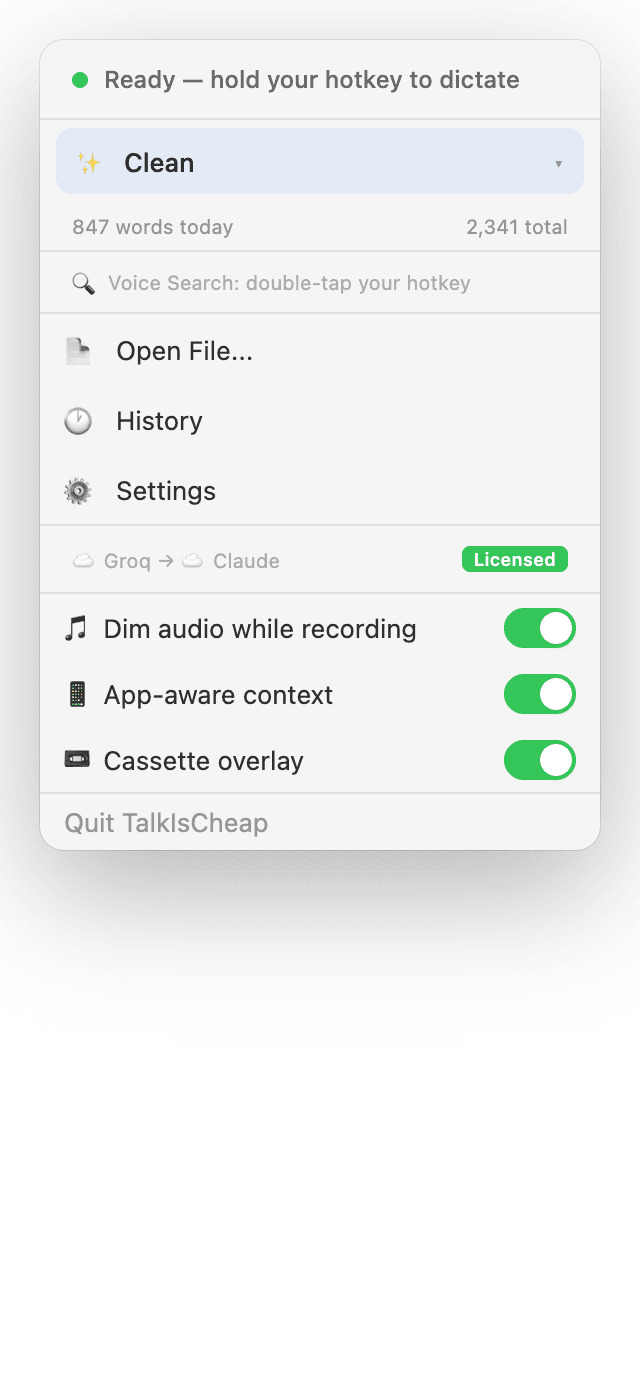
Lives in your menu bar
Always ready. Zero windows. Zero clutter.
The Difference
Why type when you can speak?
The average person types 40 words per minute. You speak 150. That is a 3.75x difference — every single time.
Typing: 2 minutes
Slow, tedious, breaks your flow
Speaking: 10 seconds
Hands-free, natural, stays in flow
Same output. 12x faster. Now multiply that by every email, message, and document you write.
Use Cases
What people use it for
Every workflow that involves typing is faster with your voice.
Reply to 50 emails in 10 minutes
Speak your reply, TalkIsCheap writes it in your chosen tone. Professional, casual, or custom.
Write Slack messages hands-free
Hold your hotkey, say what you mean, release. The polished message appears in the Slack compose box.
Dictate code comments while debugging
Stay in your editor. Speak your documentation. Code mode formats it perfectly for your codebase.
Draft proposals while walking around
Use hands-free mode. Walk, think, speak. Come back to a polished first draft on your screen.
Transcribe meetings and interviews
Right-click any audio or video file. Get a full transcript, AI summary, and chat with the content.
Research without switching apps
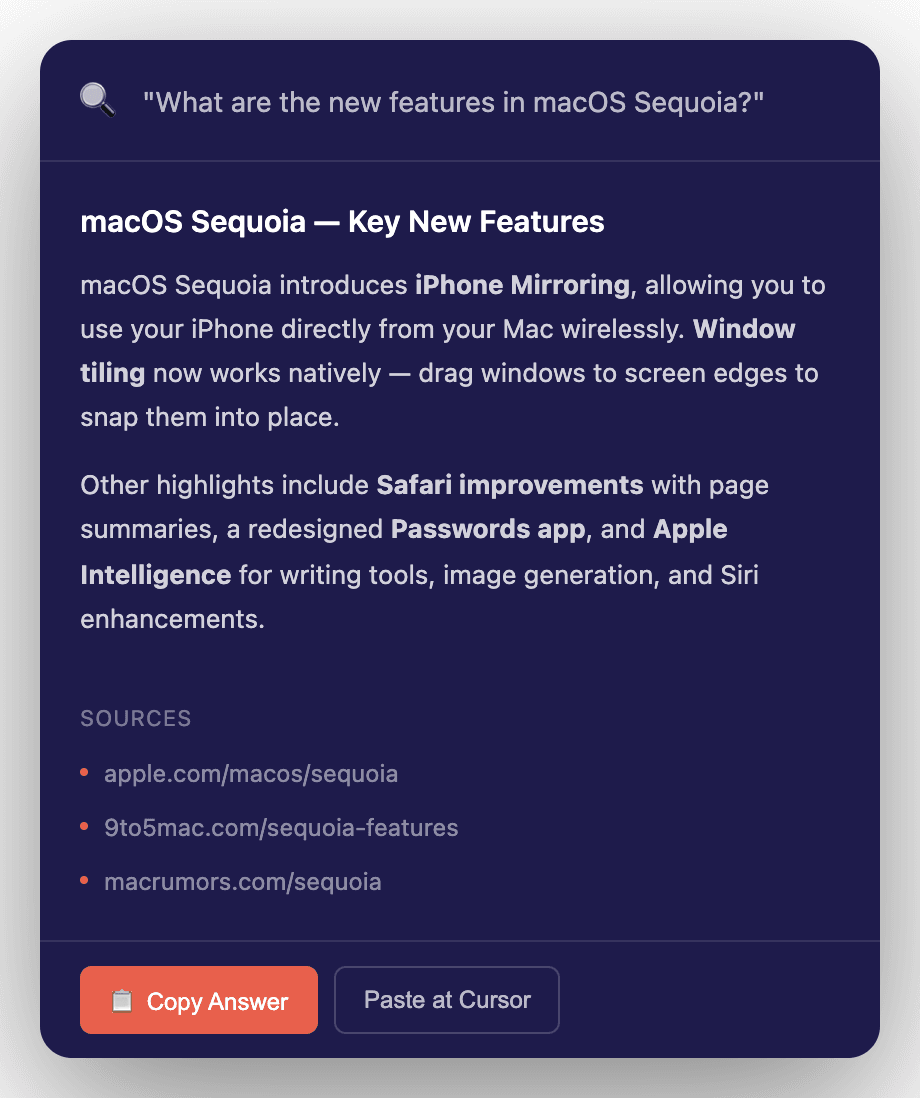
Double-tap your hotkey, ask a question. AI searches the web and summarizes the answer instantly.
Reviews
Loved by professionals everywhere
⭐⭐⭐⭐⭐ 4.9/5 from 312 reviews
Join thousands who have already switched from typing to talking
“I write 50+ emails a day. TalkIsCheap cut my email time from 2 hours to 15 minutes. I just speak and it writes perfect professional emails. Game changer.”
“I use Code mode to dictate comments and documentation while debugging. No more context-switching to type. My PR descriptions have never been better.”
“Transcribing research interviews used to take hours. Now I right-click the recording and get a full transcript with AI summary in minutes. Incredible.”
“I draft ad copy, social posts, and briefs while walking between meetings. Hands-free mode is brilliant. Marketing mode nails the tone every time.”
“The offline mode is why I bought it. I write on planes, in cafes with bad wifi, everywhere. Local Whisper + Ollama works flawlessly on my M2 MacBook.”
“$19 once vs $144/year for Wispr Flow? This is a no-brainer. TalkIsCheap actually has MORE features AND costs 90% less. Best $19 I have ever spent.”
How It Works
Three steps. Under two seconds.
No setup wizards, no complex UI. TalkIsCheap lives in your macOS menu bar and works in every app — Safari, Slack, Mail, VS Code, Notion, everything.
Hold
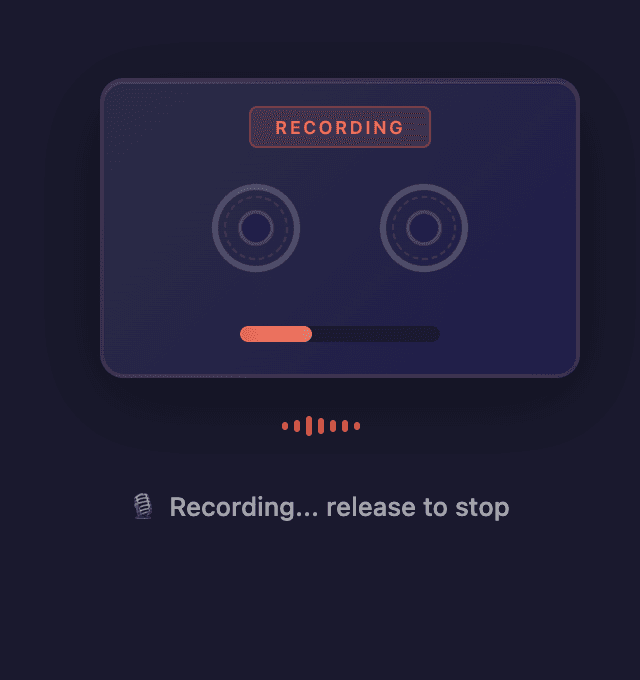
Press and hold your hotkey (Ctrl, F5, F6, or F8). A retro cassette tape animation appears on screen — you know you are recording. Or double-tap Ctrl+Shift for hands-free mode that keeps recording until you tap again.
Speak
Say whatever you want, in any of 12 languages. Mix languages freely in the same sentence — TalkIsCheap understands. Speak naturally, with filler words and pauses. The AI handles the rest.
Release
Your speech is transcribed by Groq Whisper, polished by Claude AI in your chosen mode, and auto-pasted at your cursor position. The whole process takes under 2 seconds. You never leave the app you are working in.
Features
Everything you need to ditch the keyboard
Built for people who think faster than they type. Every feature designed to keep you in flow.
Speed — feels instant
Real-time streaming
TalkIsCheap Server streams your audio to Deepgram Nova-3 while you speak. By the time you release the hotkey, the transcript is already done — we just wait ~200 ms for the final segment. No more ‘transcribing…’ spinners.
Live preview in the overlay
Watch your words appear live inside a retro cassette-tape overlay as you speak. Powered by Apple's on-device speech engine — zero network delay, zero cost. Visual feedback that kills the ‘did it hear me?’ doubt.
Fast Mode · ~300 ms
Need raw speed? Fast Mode skips the polish step entirely. Streaming transcript → straight to your cursor in about 300 milliseconds after releasing the hotkey. The polished output is still available in all other modes.
AI Polish — the quality edge
9 polish modes + unlimited custom
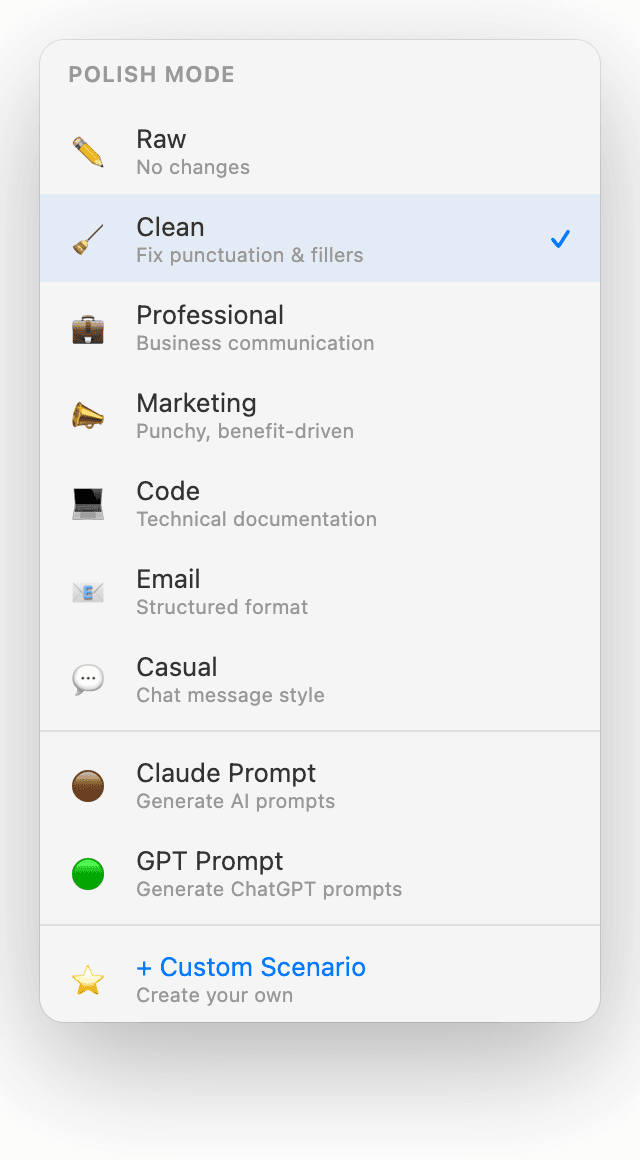
Fast, Clean, Professional, Marketing, Email, Code, Casual, Claude Prompt, GPT Prompt — nine built-in modes for every situation. Create unlimited custom scenarios with your own AI prompts for legal writing, medical notes, LinkedIn posts, anything.
App-aware mode switching
In VS Code? Code mode kicks in automatically. In Slack? Casual. Mail? Email. Linear or Notion? Professional. TalkIsCheap reads your frontmost app and picks the right polish without you thinking about it.
Denglish & multi-language
Drop English tech terms mid-sentence like a normal developer — ‘dann deployen wir das feature’ — and Claude fixes misheard words using context. 12 languages with auto-detect, full code-switching via Deepgram Nova-3 multi.
Control, privacy, and your data
Three ways to run it
☁️ Cloud (subscription, zero setup) · 🔑 BYOK with your own Groq + Anthropic keys (unlimited, pay pennies) · 💻 Offline (Apple on-device + Ollama, nothing leaves your Mac). Switch anytime.
Finder Quick Action
Right-click any audio or video file in Finder → TalkIsCheap → Transcribe. Podcasts, voice memos, meeting recordings — turned into clean text without leaving Finder. Works on any file type macOS understands.
Menu bar native, auto-updates
Lives in your macOS menu bar — zero UI clutter, zero dock icons. Built native with SwiftUI for Apple Silicon. Sparkle-signed auto-updates so you always have the latest — no App Store, no nagging.
Tracking & Organization
Stats & Analytics
Track words dictated today, this week, and all time. See processing times, your most-used apps, and estimated time saved. A small motivation boost every time you glance at the menu bar.
Transcription History
Every dictation is saved in a local SQLite database. Full-text search across everything you have ever dictated. Find that brilliant idea from last Tuesday in seconds.
Auto-Paste at Cursor
Finished text is automatically pasted wherever your cursor is — email compose boxes, Slack messages, code editors, Google Docs, Notion. No copy-paste dance. You speak, it appears.
Polish Modes
Say it once. Polish it any way.
Seven built-in modes for every situation. Or create your own with custom AI prompts. Your voice, your rules.
See the difference: one recording, four outputs
This is where the magic happens. Same messy speech, perfectly adapted for each context.
so basically um the meeting went well and uh we decided to move forward with the project
The meeting went well and we decided to move forward with the project.
The meeting concluded positively. The team has decided to proceed with the project as planned.
Great news — the project is a go! The team is aligned and ready to move forward.
New in v2.0
Voice Search.
Like having a research assistant.
Double-tap Ctrl and ask anything. TalkIsCheap searches the web via Brave Search, then Claude AI summarizes the answer in a floating panel — all without switching apps.
Requires a Brave Search API key (free tier available) and Anthropic API key.
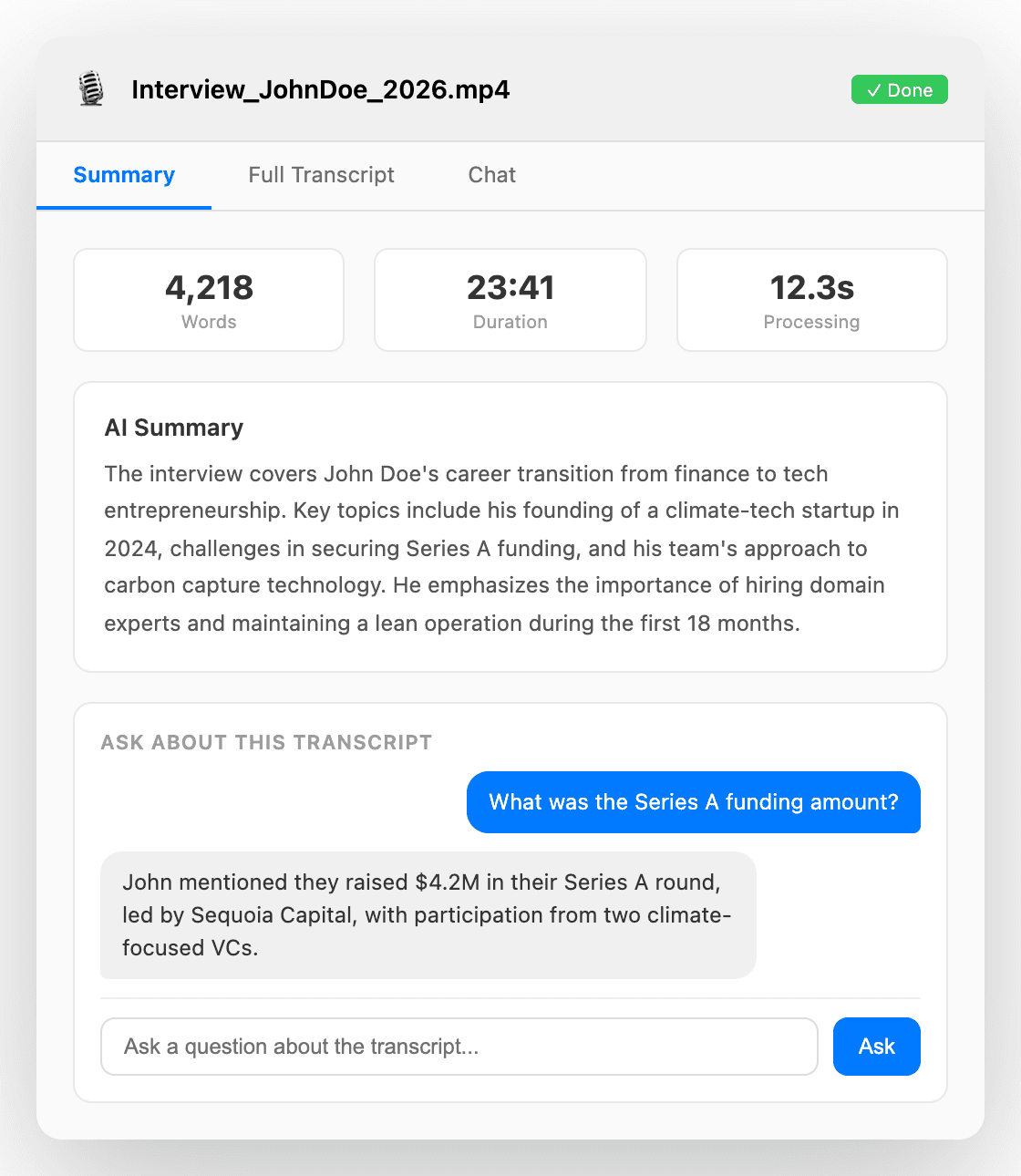
File Transcription
Transcribe anything.
Right from Finder.
Right-click any file in Finder and choose Transcribe & Summarize. Works with audio, video, PDF, and Word documents. Get a full transcript, an AI-powered summary, and chat with the content.
Integrated as a macOS Finder Quick Action — right-click any audio or video file and transcribe it instantly. No extra steps.
Dual Engine
Cloud or local. Your choice.
Both engines deliver the same experience. Switch between them anytime from the menu bar or system tray. Use cloud for speed, local for privacy. Local mode is available on macOS with Apple Silicon only.
Cloud Mode
Maximum speed · macOS native
Best for daily use. Groq's free API handles transcription, Claude Haiku polishes for about a tenth of a cent per use. 1,000 dictations cost roughly $1. Native macOS app.
Local Mode
Maximum privacy · macOS only (Apple Silicon)
Best for sensitive work, airplane mode, or anyone who wants zero cloud dependency. Apple's on-device speech engine transcribes, Ollama polishes locally — nothing leaves your Mac. No API keys needed.
Comparison
TalkIsCheap vs Wispr Flow
Same idea. Very different execution and price.
How much are you overpaying for voice-to-text? With Wispr Flow, you pay $144 every year — forever.
With TalkIsCheap, you pay once and own it for life.
| TalkIsCheap | Wispr Flow | |
|---|---|---|
| Price | ✓$19 once | $144/year |
| Offline mode | ✓Full local engine | No |
| Privacy | ✓Direct API calls | Their servers |
| Custom prompts | ✓Unlimited | No |
| Polish modes | ✓7 + custom | Limited |
| Works in any app | ✓Universal text field support | Yes |
| Voice search | ✓Brave + Claude AI | No |
| File transcription | ✓Audio, video, PDF, Word | No |
| Recording overlay | ✓Cassette animation | No |
| Hands-free mode | ✓Ctrl+Shift toggle | No |
| History & stats | ✓Full SQLite DB | No |
| Languages | ✓12 + auto-detect | Some |
| Open source | ✓Bring your own keys | Closed |
Setup
Bring your own API keys
Your audio goes directly to these APIs. TalkIsCheap never sees it, stores it, or processes it. Or go fully offline — no keys needed at all.
Groq — Speech Engine
Free API key. Whisper Large V3. Blazing fast cloud transcription. Sign up, copy the key, paste into TalkIsCheap. Takes 30 seconds.
Get free API keyAnthropic — Polish Engine
Claude Haiku polishes your text with context awareness. Costs about $0.001 per dictation — that is 1,000 dictations for $1. Also powers voice search and file summaries.
Get API keyOr skip API keys entirely — use local mode with mlx-whisper + Ollama for 100% offline, free dictation.
FAQ
Frequently asked questions

Stop typing.
Start talking.
Pay once. Use forever. No subscription. No data collection.
⭐⭐⭐⭐⭐ 4.9/5 from 312 reviews
We handle the API keys. Just install and talk.
- Zero setup — no API keys needed
- 5000 dictations per month
- 500 voice searches per month
- 100 file transcriptions per month
- Up to 3 Macs per license
- Cancel anytime
Same as Monthly. 2 months free.
- Everything in Pro Monthly
- Save 34% vs. monthly billing
- Same usage limits
- Lock in the launch price
- Upgrade or downgrade anytime
- Perfect for daily users
Bring your own API keys. Own it forever.
- Pay once. Use forever.
- Unlimited dictations — no caps
- You provide Groq + Anthropic keys
- ~$2/mo API costs (or free tiers)
- Offline mode included
- 1 device, 30-day money back
Or start free — 10 uses, no credit card, no signup: